Adding a region
What to do when your sim spreads to another Second Life region - count its roleplay, ask for the Experience there, and put it on the RP map and in the event planner's Region list.
For staffYour sim can cover several Second Life regions. The HUD, doors, fights and most other things work on any region where players wear the HUD, with nothing to set up. A few lists name your regions, though, and a new region has to be added to them before it counts for roleplay or shows up when you plan an event.
The region lists
| List | Where | What it does | Who can change it |
|---|---|---|---|
| Roleplay regions | Server › Settings, Regions tab | Emotes posted there are logged. They earn roleplay XP, show on RP hot spots and count on event reports | Settings - Edit (sim_settings) or Super Admin |
| Experience regions | Server › Settings, Regions tab | The HUD asks players to allow your sim’s Experience there. Only matters if your HUD is built with one | Settings - Edit (sim_settings) or Super Admin |
| RP hot spots levels | Moderation › RP hot spots | A region with at least one level is in the event planner’s Region list, and its levels and rooms are the places an event can be narrowed to | Admin or Super Admin |
Type a region’s name exactly as Second Life shows it.
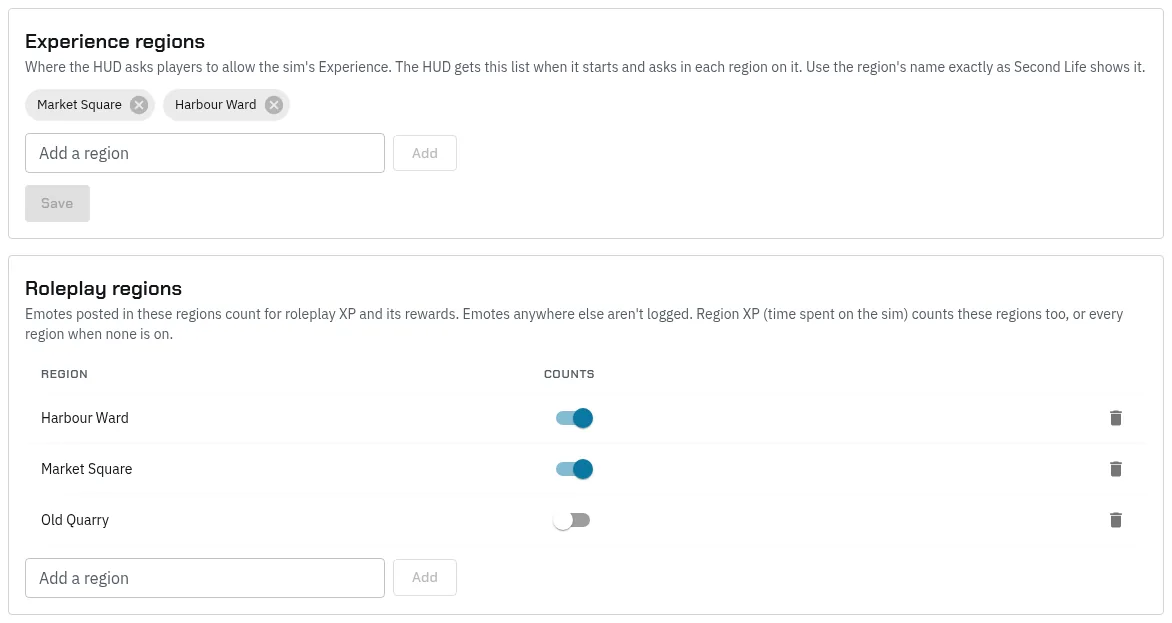
Add a region
-
Count its roleplay. On Server › Settings, Regions tab, under Roleplay regions, type the name in Add a region (or pick one the system has already seen) and press Add. It’s on straight away. Counts switches a region off later without removing it.
-
Ask for the Experience there (only if your HUD uses one). Under Experience regions, add the region the same way and press Save. See In-world setup.
-
Put it on the map. On Moderation › RP hot spots, pick the region under Region. Every roleplay region is there, even before anyone has emoted on it. Press Add level:
- Level: a name, such as
GroundorWhole region. Section is optional, for grouping floors such as the levels of one building. - Height from (z) and to (z): the heights where people play. For one level that covers everything, use
0and4096. Under the boxes, the page counts the emotes in that range so far, which is none on a new region. - Area (metres): press Whole region, or narrow it to one part.
- Photo (optional): a floor plan or a top-down snapshot, north up.
Press Save level.
- Level: a name, such as
-
Check the planner. On Main Menu › Events, press Plan an event. The region is now in the Region list for everyone who plans events.
Once people roleplay there, RP hot spots shows the busiest heights no level covers yet, under the level list. Press one to start a level with that height range, so you can split the region into floors. Add room names a room on a floor. Event places come from these, and the event’s after-action report counts only the emotes made inside the place chosen.
If a region is missing from the event planner
The Region list on Plan an event holds:
- every region with at least one level on Moderation › RP hot spots;
- the region your own HUD was last on, which only you see, and which is picked for you;
- when you edit an event, that event’s own region.
So if you see a region your other planners don’t, you’re standing on it and it has no level yet. Add one (step 3 above).
If a region is missing from RP hot spots
RP hot spots lists every region on Roleplay regions, every region with a level, and any other region with emotes logged in the days you picked. If a region is missing, add it under Roleplay regions (step 1 above).
If the region is there but its heat map stays empty, check that Counts is on and that the name matches what Second Life shows. Emotes are only logged on roleplay regions, under the name Second Life gives the region.
Other pages that name a region
These are set where they’re used, not from a list. Type the region’s name the same way:
- Crafting stations and gathering nodes: see Items and crafting.
- Lawful zones: see World building.
- Coins minted in a region, faction Territories for trade tax, and Community projects: see The economy.