Storyteller tools
The Storytellers menu for running scenes - lights and power, the sky, sounds through players' HUDs, the radio, alarms, fights and community projects.
For staffThe Storytellers menu holds what you need to run a scene as it happens: lights and power, the sky, sounds, the radio, alarms and fights. You see each page your permissions allow. This guide covers the pages you use during a scene; setting up the objects behind them is in World building.
| Page | What it’s for | Permission |
|---|---|---|
| Party control | Watch and run fights | hud_npc_menu, or admin |
| Lighting control | Switch lights and power on and off | env_light_control, or admin |
| Alarms | Fire and silence alarms | env_alarm_trigger or env_edit (admins can look) |
| Weather & environment | Change the sky for one person, everyone, or a whole sim | env_light_control or lighting_edit |
| Sound board | Play a sound through players’ HUDs | hud_sounds, or admin |
| Community projects | Run sim-wide projects players contribute to | plan_events or quest_edit, or admin |
Lighting control
Lights follow the power they get. Lighting control shows each zone as a chain, from its generator or power panel down through its switches to its lights, so you change a light by changing what feeds it.
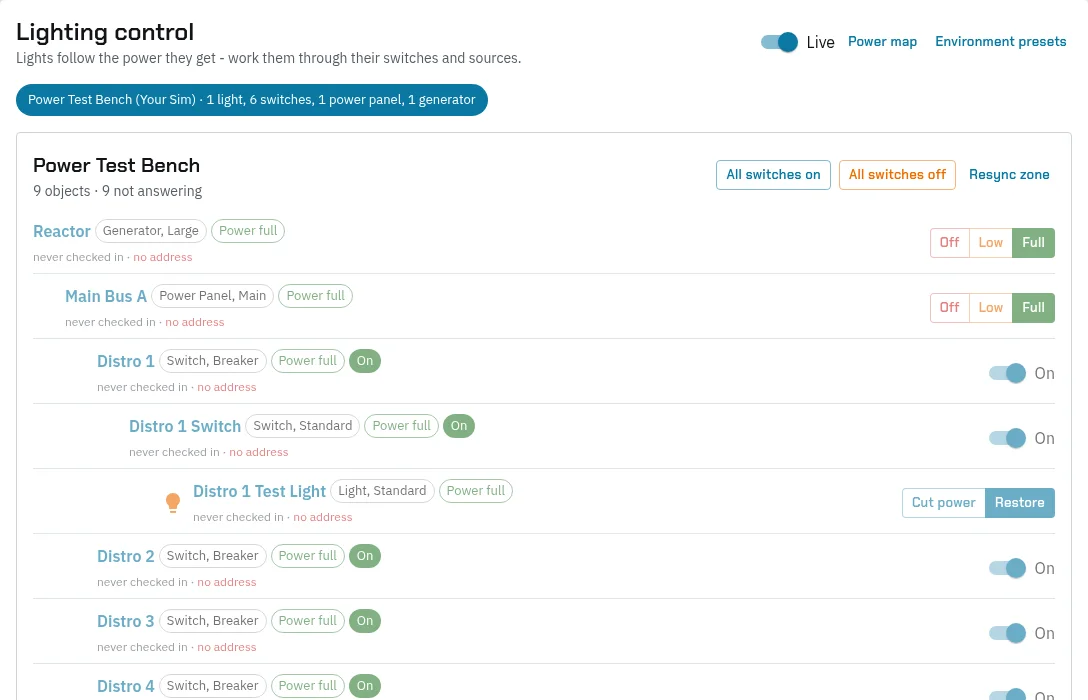
- Pick a zone from the chips at the top. Each chip counts its lights, switches, panels and generators.
- Change what you need:
- A generator or power panel: Off, Low or Full. What it feeds gets that power, and emergency lights come on while power is low or out.
- A switch or breaker: flip it On or off. Everything after it follows.
- A light: Cut power or Restore just that one.
- All switches on and All switches off flip every switch in the zone at once.
- Leave Live on to see changes made in-world, by players or other staff, as they happen.
An object marked never checked in or not answering isn’t reachable in-world: it was removed, or its script stopped. Resync zone pushes everything to every object in the zone again, for when the in-world objects have drifted from what the page shows. Power map shows the same chain as a diagram.
Tip: to keep a light dark, switch off its source rather than the light. A restored feed turns the light back on.
Weather & environment
This puts a Second Life environment, its sky, water and light, on players’ viewers through their HUD. Environments are added once, on the Presets tab: Add a preset, with a name and the Environment asset UUID. Adding and deleting presets needs lighting_edit.
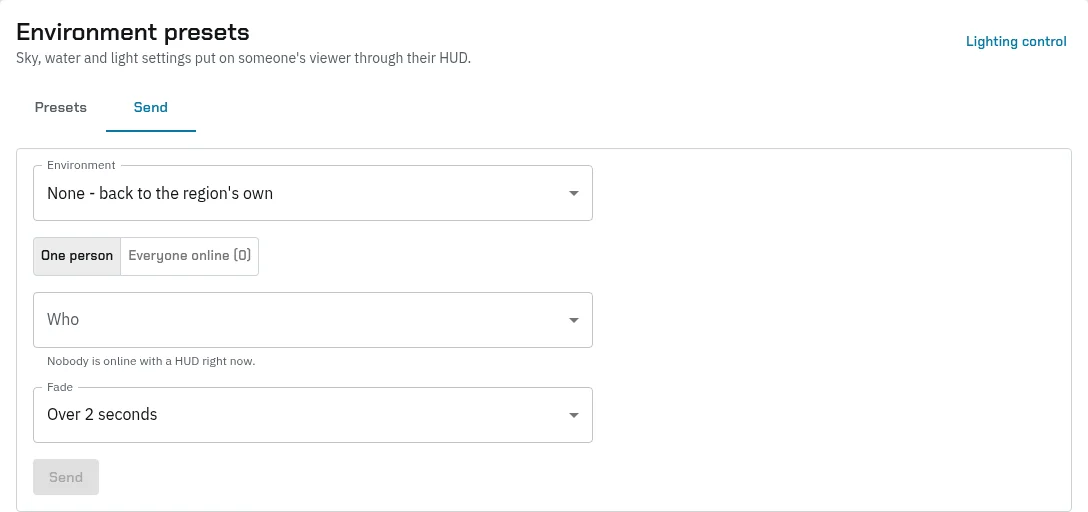
On Send:
- Pick the Environment. None - back to the region’s own takes a preset off again.
- Choose One person and pick Who, or Everyone online.
- Pick how long it takes to Fade in, and press Send.
Under Sim default, set the environment for a whole sim: pick the sim, or Where someone is to use the sim a player is standing in, then the Environment and Fade, and press Set the sim’s default. Everyone there wearing the HUD gets it, replacing anything sent to them, and so does anyone who arrives or logs in there, until you press Back to normal. Visitors without the HUD see the normal sky.
Sound board
Play any sound you have, by its UUID, through players’ HUDs: an announcement, a voice in someone’s head, thunder, a siren.
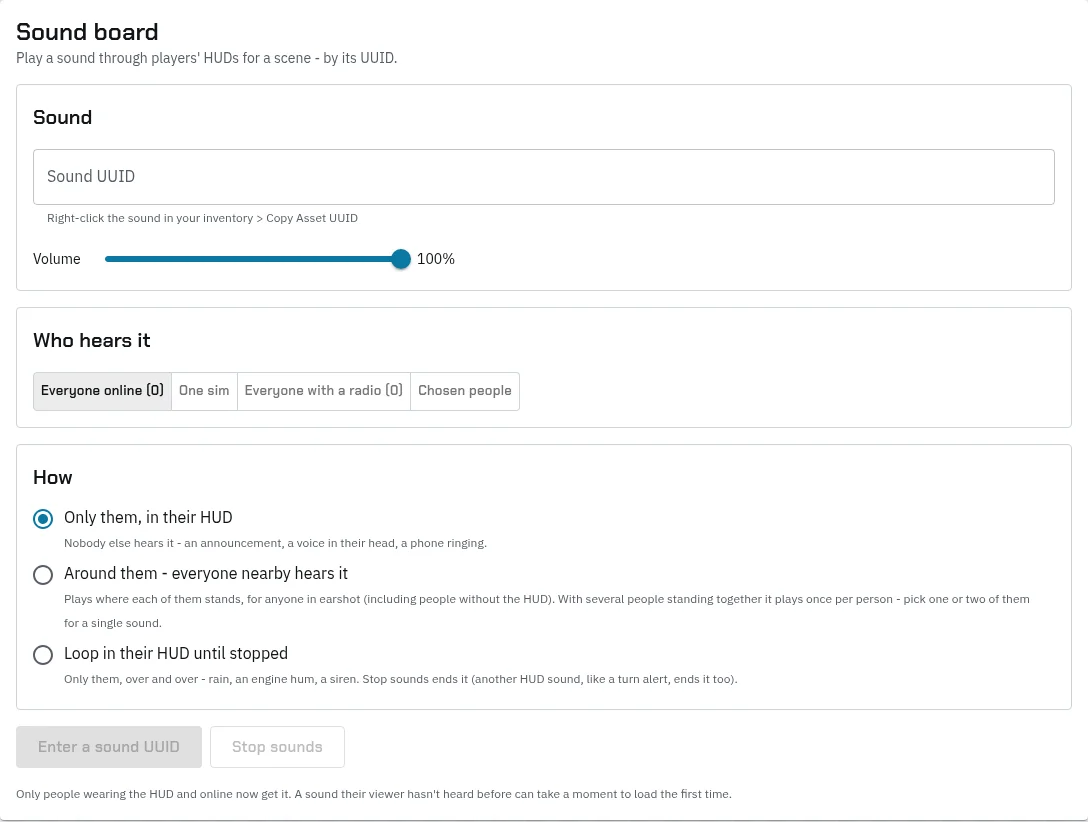
- Paste the Sound UUID: in your inventory, right-click the sound and choose Copy Asset UUID. Set the Volume.
- Choose Who hears it: Everyone online, One sim, Everyone with a radio or Chosen people.
- Choose How:
- Only them, in their HUD: nobody else hears it.
- Around them: it plays where each of them stands, for anyone in earshot, with or without the HUD. With several people standing together it plays once for each, so pick one or two of them for a single sound.
- Loop in their HUD until stopped: over and over, for rain, an engine hum or a siren. Stop sounds ends it, and so does the next sound their HUD plays, such as a turn alert.
- Press the play button.
Only people online and wearing the HUD get it. A sound their viewer hasn’t heard before can take a moment to start the first time.
The radio
@radio <message> reaches everyone online with an item named Radio equipped. As a storyteller (radio_storyteller), type @radio as <name> to speak as a story character without carrying a radio, and @radio as off to go back to yourself. The radio Discord group gets a copy if you’ve set one up.
Alarms, fights and projects
- Alarms fires and silences alarm zones with a preset’s sound and lights. See Power, doors and alarms.
- Party control lists every fight, lets you step in, play NPCs, add or remove fighters and end a fight. See Running a fight.
- Community projects starts and tracks projects the whole sim works towards. See The economy.
- To bring an NPC into a scene, see Quests and NPCs.