Get the HUD for your roleplay sim
Black Box isn't something players buy one at a time. Each sim runs its own Black Box, set up for that sim, and hands the HUD to its players. If you run a roleplay sim and want Black Box for it, this is how.
What comes with it
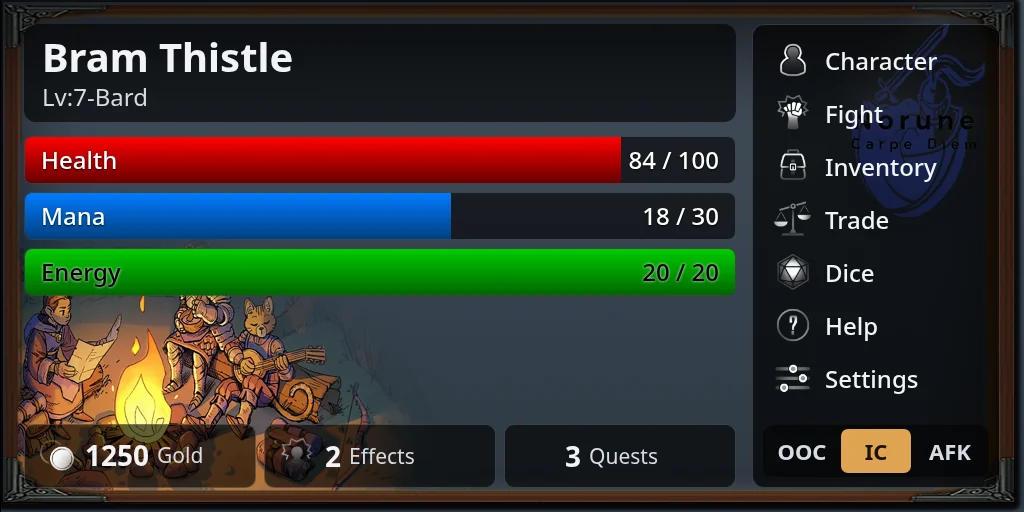
The HUD
For every player, in your sim's theme, with the parts of the game you switch on.
A delivery server
An in-world object that hands the HUD out to your players and sends them a new copy when there's an update.
Your website
Your sim's own address for players and staff, where your team sets up the game and looks after players.
In-world objects
The titler, and the doors, lights, alarms, crafting stations and containers your game uses.
How to get it
- 1
Tell us about your sim
Join the Discord and tell us its name, the kind of roleplay you run, roughly how many players you have, and what you want the HUD to do.
- 2
Your sim's Black Box is set up
Every sim gets its own: its own database, settings and website address, so nothing you build mixes with another sim's.
- 3
Get the in-world kit
The HUD, the delivery server that hands it out, and the other objects your game uses.
- 4
Build your game and open the doors
Set up your rules, characters, items and quests on the website, give the HUD your look, put out the delivery server, and your players can start.
We'll go through what your sim needs, and the cost, with you on the Discord. The features page lists everything Black Box can do, and the staff guides show the website your team will use.
Talk to us on the Discord
Tell us about your sim and we'll take it from there.
Join the DiscordLooking for the HUD as a player?
Your sim hands it out, usually from a kiosk or its staff. See how to pick it up and wear it.
Wearing the HUD →