Finding alt accounts
How to spot a banned player coming back on another avatar, how much each match tells you, how to confirm it with the logs, and what to do.
For staffSome players come back after a ban on a new avatar, sometimes years later. Black Box keeps track of where each account signs in from so you can find them. This guide shows what each kind of match means, how to check it, and how to act on it. The account page and bans themselves are covered in Moderation.
You need alt_list to see matches, and view_logs to check them in the logs.
Where the matches come from
Every time someone signs in to the HUD or the website, the system notes:
- their IP address, kept only as a scrambled value that can be compared, never read back;
- their website browser, which keeps a mark between visits (the HUD can’t: the viewer’s built-in browser starts empty every time you wear it);
- their computer, read by the HUD and the website from the machine itself: the graphics card and its driver, the processor, the memory, the time zone and the way the browser draws.
Only scrambled values are kept, never hardware names, and they’re kept for good, so a player who comes back after a long break still matches. To forget computers nobody has used for a while, set the global alts-deviceKeepDays to that many days.
Read the matches
Open the account under Staff › Players and scroll to Possible alts. Each other account has the reasons it matched and when it was last seen:
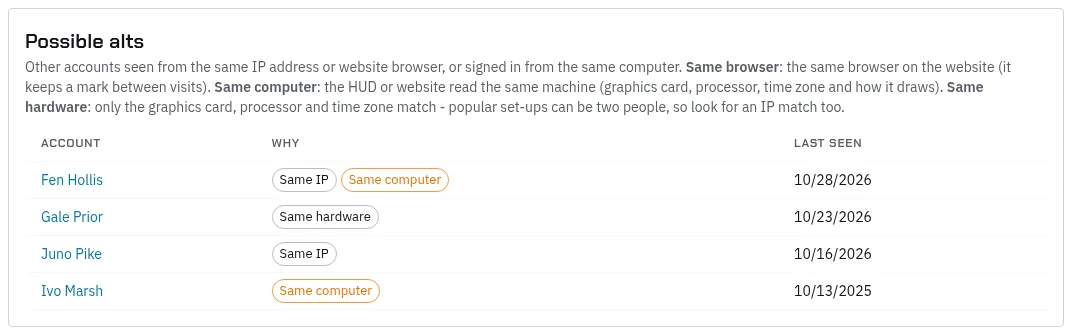
| Reason | What it means | How much it tells you |
|---|---|---|
| Same computer | The HUD or website read the same machine, down to how it draws | Strong. It holds through a VPN, a new IP and a new avatar |
| Same browser | The same browser signed in to the website | Strong, but only for website sign-ins |
| Same IP | Signed in from the same internet address | Medium. Housemates, partners and some phone and work networks share one |
| Same hardware | Only the graphics card, processor and time zone match | Weak on its own. Popular gaming set-ups can belong to two people |
Two reasons together, such as Same IP with Same computer, are much stronger than either alone. Last seen tells you whether the match is current or from long ago.
Careful: a match isn’t proof by itself. Two people in one house share an IP, and the same popular graphics card turns up across a whole sim. Check the logs before you act.
Check it in the logs
Open Logs and look at both accounts’ characters:
- Player timeline: put the two characters’ timelines side by side. Alts are rarely online at the same moment, and often one signs off just before the other signs in.
- Character switches: someone swapping characters just before a trade or fight.
- Trades and Coins: items and money passed one way between the two, especially just before a ban or just after a new account appears.
- Bans: whether the older account was banned, when and why.
On the radar (Moderation › Radar), open each avatar’s page: every name they’ve had, their time on the sim and their bans. A new avatar that turns up days after a ban and goes straight to the same places is worth a closer look. Admins can pick a single character on Moderation › RP hot spots to see where they roleplay; that look is logged.
See Reading the logs for how to filter each log.
Act on it
Once you’re sure:
- Ban the new avatar from its radar page, with a reason that names the account it’s linked to, so the next person on staff sees why. A ban is per avatar, so each new one needs its own.
- Lock the account on its account page (
account_lock). That shuts it out of the HUD and the website, whichever avatar signs in to it. - Disable characters you don’t want played, from the character’s Manage tab.
If someone isn’t sure, leave a private comment on the character’s sheet and keep an eye on the account: matches keep building up as they sign in.
When there’s no match
A player can avoid matching by using a different computer, or by signing in to the website only from a browser built to block tracking, such as Brave, which changes what it reports every visit. The HUD always runs in the viewer’s own browser, so HUD sign-ins are the most reliable. A brand-new avatar with no HUD sign-in yet has nothing to match until they wear it.
Accounts on the IP log exclusion list, which the Black Box team keeps, aren’t recorded at all.