Characters
Everything about who you play, from making them to levelling them up.
- Step-by-step creator
- Name and race, class, stats, profession and starting gear, then a last check. On the HUD, or on the website if the sim prefers.
- Several characters
- Keep a handful of characters on one account and switch between them.
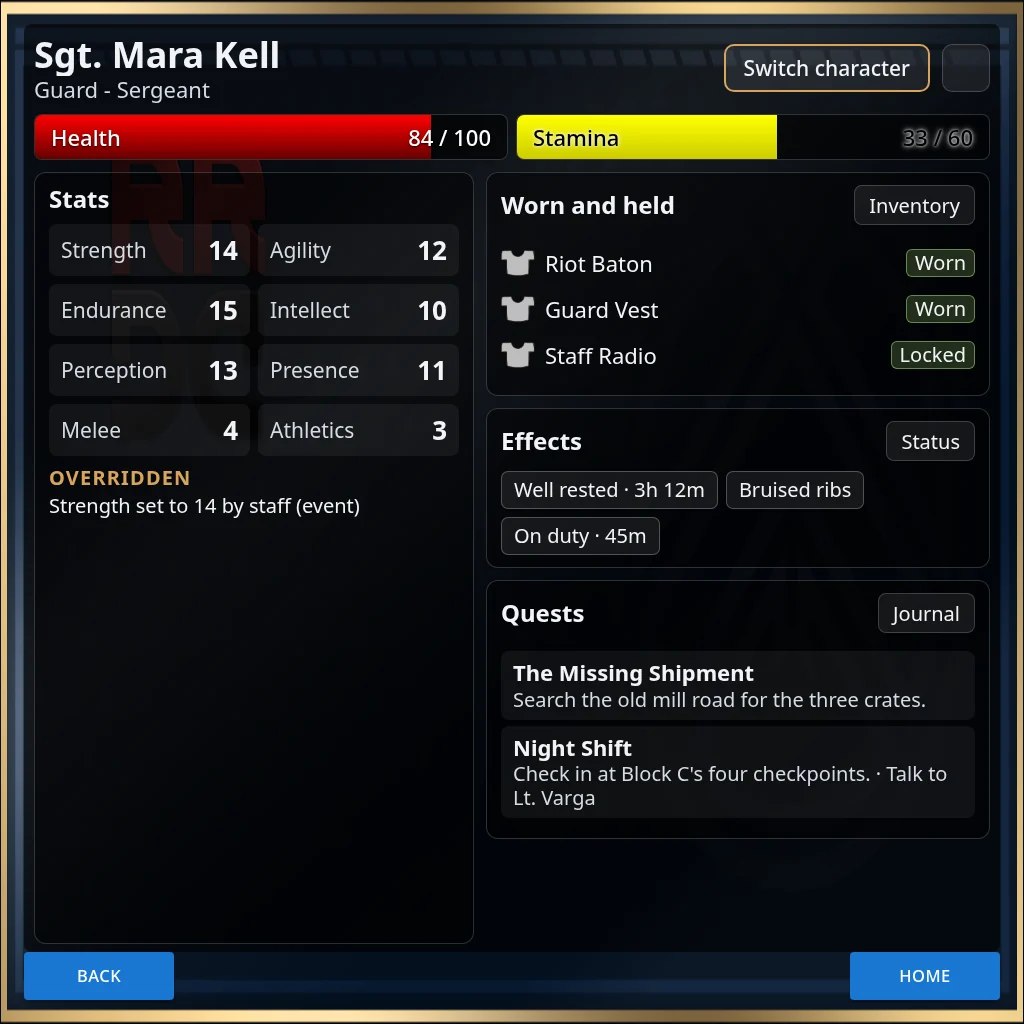
- Character sheets
- Stats, gear, effects and quests on one page, on the HUD and the website. Staff can approve sheets and see what changed.
- Levels and perks
- Level up, spend stat points and pick perks. Respecs work on your sim's terms: free, staff only, or with a cost and a wait.
- Professions
- A main profession and a second one later on, with a way to change the main one.
- Designed on the website
- Classes, races, stats, skills and starting stats are all set up by staff, no scripting needed.
Fights
Turn-based fights on the HUD, with as much or as little rule as your sim wants.
- Turn order
- Invite players and NPCs, the leader starts, and everyone takes their turn in order.
- Abilities and targets
- Abilities cost energy, mana or HP and have cooldowns. Aim at one target, several, or share attacks out between them.
- The fight page
- Both sides in their rows and a log of what happened, at half or full size. Players can fight from the website too.
- Staff-run NPCs
- Storytellers run NPCs in the same fight from the website, and can move them on a fight map.
- Effects
- Buffs, debuffs, damage and healing over time, damage reduction and reflection, all designed on the website.
- Wounds or sparring
- Wounds that need treating, or sparring matches that leave none and give your HP back.
- Dice
- Free rolls and named checks from your rule set's formula, with a dice history staff can review.
Optional rules include- Surprise rounds
- Action points
- Tactical movement
- Cover and flanking
- Parry and dodge
- Overwatch
- Wounds
- Stealth
- Grapples
- Climbing and falls
- Armour
- Carry weight
- Area of effect
- Drones and turrets
- Range bands
- Weapon quirks
- Magic and runes
- Saving throws
- Front and back rows
- Fleeing
Items and crafting
What players carry and make.
- Inventory
- Equip into slots, use, give, drop and favourite items from the HUD.
- Items that do things
- Consumables, scrolls and wands that cast abilities, and keycards that open doors.
- Crafting stations
- Recipes, a timed queue, profession requirements and success chances, at stations around the sim.
- Gathering and storage
- Search nodes for materials once a day, and share containers with your group.
- Optional extras
- Durability and repair, salvage, quality, signature items and more, each switched on separately.
Money and trade
An economy staff can steer.
- Your currency
- One currency, or a purse of coins in several sizes.
- Vendors and the item store
- NPC vendors that restock, and an item store on the website.
- Bank
- Accounts, cards with PINs, ATMs, transfers and interest.
- Player trade
- Pay people, bid at the auction house, post crafting orders and rent stalls.
- Community projects
- Server-wide goals everyone donates to, unlocking perks when they're met.
- Staff controls
- An economy that balances itself week to week, faction taxes, and a pause switch.
Story and community
The parts that keep people coming back.
- Quests
- Stages, branches and rewards, with NPCs that talk and choices that can call for a skill roll.
- Story map
- Staff build quests on the website and hook them to things players touch in-world.
- Events
- Plan events, check people in, brief helpers, collect feedback, and turn it all into awards.
- Rewards for roleplay
- Experience for emoting, with caps per session, day and week. What players write is never stored.
- Reports and awards
- Players send XP and IC reports; staff review them and give out awards.
- Groups and ranks
- Groups with ranks and roles, promotions earned through influence, and stipends.
- Bounties
- In-character bounties that need an authority's approval.
The world
In-world objects that tie the sim to the HUD.
- Titler
- Name, title, rank, health and status over every head, with the tags your sim uses.
- Doors, power and alarms
- Doors, lights, generators and alarms that answer to skill rolls and power, with lockdowns at a press.
- Weather and sky
- Send sky presets to everyone's HUD, or set the sim's default, without estate rights.
- Zones
- Lawful zones that report hostile magic and mark the caster wanted.
- Sound and radio
- Play sounds through everyone's HUD, and a staff radio.
- Delivery
- A server that hands out the HUD and products, and keeps the HUD up to date.
The HUD
One HUD that fits every sim.
- Three Home layouts
- Classic, Side menu and Portrait, plus a strip that stays on screen when you shrink it.
- Themes
- Each sim and each group can have its own art, colours and icons.
- Your buttons and bars
- Staff choose the buttons, bars and counters on Home.
- Languages
- English and German, and staff can reword any line for their sim.
- In a browser too
- Open the HUD in a normal web browser and sign in there.
The website
Every sim's website, for players and staff alike.
- For players
- Your characters, XP, reviews, quests and purse, your own look, and two-factor sign-in.
- For staff
- Menus for game design, world building, storytelling, moderation, staff and the server.
- Roles
- Staff roles with their own menus and permissions.
- Logs and automation
- Logs of what happened, scheduled jobs, and Discord alerts and role pings.
- Panic switches
- Pause the economy, or switch the server off, in one place.