Your inventory
How to find, equip, use, give away and delete the items your character carries.
For playersThe Inventory page lists everything your active character carries. Open it with Inventory on the Home screen or on your character sheet.
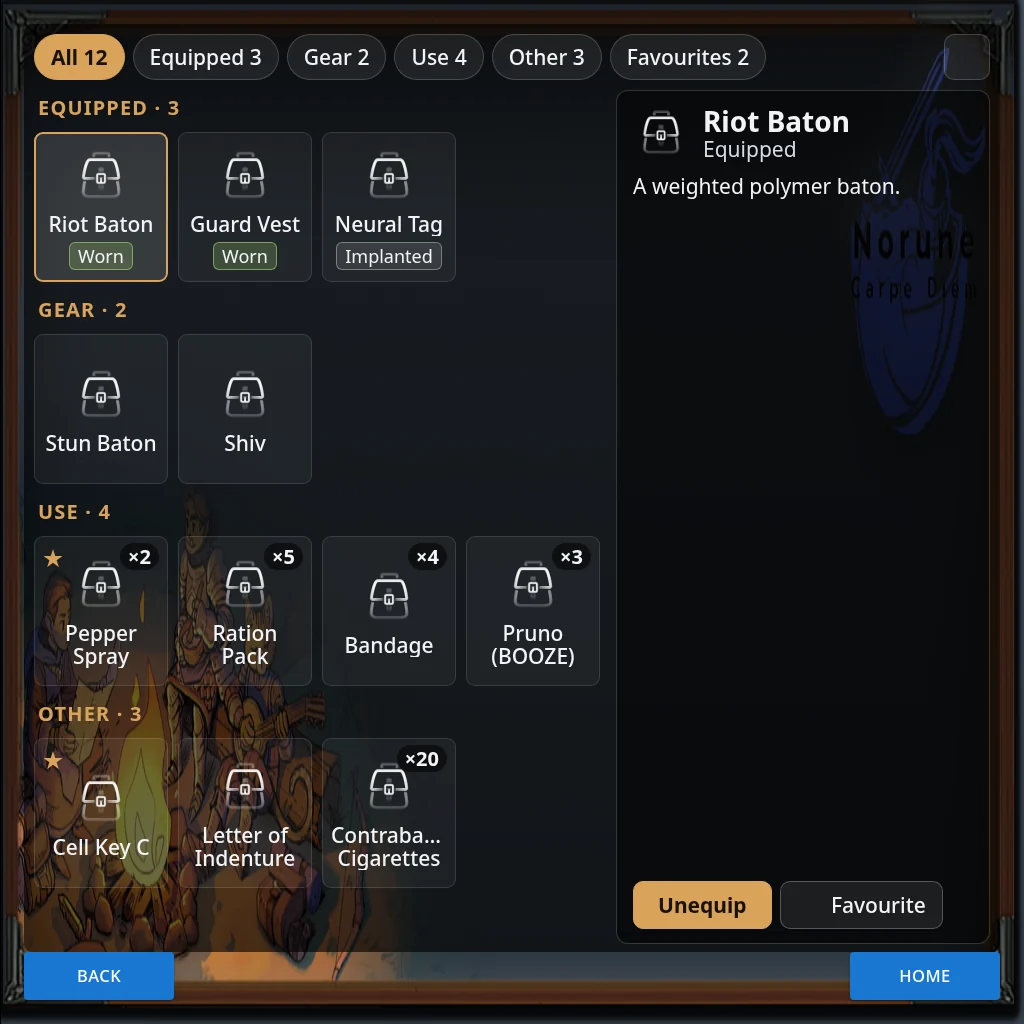
The tabs
The tabs along the top sort your items, each with a count.
- All: everything, under headings.
- Equipped: what you’re wearing or holding, and anything implanted or locked on you.
- Gear: things you could equip.
- Use: things you can use, such as food or bandages.
- Other: everything else, such as keys and materials.
- Favourites: the items you’ve starred.
An item goes in the first group it fits, so a weapon you’re wearing shows under Equipped. The group tabs appear when you carry more than one kind of item, and Favourites appears once you’ve starred something. If your sim uses slot rules, a Slots tab shows what’s in each slot.
Several identical copies of one item show as a single row, such as “7 copies”. Its buttons act on one copy at a time.
Look at an item
Press an item to see its details and buttons on the right. A worn item is tagged Worn, or with its slot name. Implanted and locked items are tagged Implanted or Locked, and you can’t take them off here.
The square button at the top right switches between Full size and Half size. Full size makes the panel taller so you can see more at once.
Equip, unequip and use
- Equip puts a piece of gear on. It moves to Equipped.
- Unequip takes it off again.
- Use uses the item, such as eating food or drinking a potion.
Favourite and delete
- Favourite stars an item, and Unfavourite takes the star off. Starred items show a ★ and appear on the Favourites tab.
- Delete destroys the item for good. The HUD asks first, and you confirm with DELETE. On a row of copies it deletes one copy. On a stack, such as ×20, it deletes the whole stack. Local chat says what you dropped.
You can only delete items you aren’t wearing. Unequip an item first.
Give an item to someone
Giving happens on the Trade page:
- Press Trade, then Player. Everyone within 10 metres who has their HUD on is listed.
- Press Gift next to the person.
- Use + and - to pick how many of each item to hand over.
- Press Confirm.
Use next to a person uses one of your items on them instead, such as a bandage. Some items can’t be given. On some sims, for example, a starting kit is bound to your character. See Money and trade for paying people and the other ways to trade.
List your inventory in chat
Press and hold Inventory on Home for two seconds. The HUD lists your inventory in chat, seen only by you, and doesn’t open the page. A short press opens the page as usual.
You can also give, drop and favourite items by chat command. See Chat commands.
Extras your sim may use
Some sims switch on more things you can do with an item. When one applies to the item you picked, it appears as an extra button in its details. Hover over a button to see what it does, and the HUD tells you what will happen before anything changes.
- Repair: brings a worn item back to full durability, for a little of its maximum.
- Reforge: brings an item’s worn-down maximum back up. This is a Grandmaster’s work.
- Salvage: breaks gear down for some of its materials.
- Quality: spends the quality points on a copy you made.
- Signature and Name it: mark a masterwork you made as a Signature piece, then ask staff to approve a name for it.
- Heirloom: makes a Signature piece an heirloom, using a legendary component.
- Use letter: a letter of indenture changes your main profession.
Crafting, enchanting and gathering are in Crafting.