Start a fight
How to open the fight page, invite people, start the fight and find your way around the page.
For playersEvery fight runs from the fight page. Press Fight on the home screen to open it.
Invite people
- Press Invite. The list shows people within 20 metres who are wearing the HUD.
- Press Team 1 or Team 2 next to someone to invite them to that side.
- They have two minutes to accept.
If you were not in a fight yet, your first invite starts one, with you as its leader on Team 1. Anyone already in it shows Already in group.
Staff who run NPCs also see Invite NPC, which adds an NPC the same way and makes you its controller. Before the start, link each NPC’s titler: touch it and choose Set NPC.
If your sim lets only staff run fights, players can’t invite or start, and chat tells you to ask a storyteller.
Join when invited
When someone invites you, a box on your HUD names them and your team. Press Accept or Decline, then open Fight. Until the fight starts, the page reads Waiting for the leader to start.
Start the fight
The leader’s page reads You lead this fight. Start appears once both teams have someone in them and every NPC is set up.
- Start begins the fight.
- Start (Surprise) appears if your sim uses Surprise Rounds. It gives the fight a Surprise Round in which only you act.
If your sim allows sparring, the leader also sees Sparring: Off. Press it before Start to make it Sparring: On. Nobody in a sparring match is wounded. Depending on your sim, there is also no looting, and everyone’s HP goes back to where it started. Chat says which, and everyone’s page shows Sparring at the top. It can’t be changed after the start.
In chat:
@party startor@party start surprise@party sparand@party spar off
Turn order
At the start everyone rolls initiative, and the rolls and the order appear in local chat. The highest roll goes first. If your sim alternates teams, turns swap between the sides. Anyone on 0 HP is skipped.
The line at the top shows the stage: Not started, Surprise Round, Scatter Phase, then Round 1, Round 2 and so on. If your sim uses a Scatter Phase, everyone gets one turn to prepare before Round 1, with no attacks. Beside the stage is Your turn, or whose turn it is.
If your sim uses Go Last, Go Last: Off shows before Round 1. Press it to act after everyone else from Round 1 (@party golast, or @party golast off to take it back).
Half size and full size
At half size, your name, bars and status sit on the left, with the last thing that happened underneath. On the right is TURN ORDER (IN THIS FIGHT before the start).
Press the expand button at the top right (Full size) to fill the whole panel. Full size shows:
- Your side and Other side, each fighter with their place in the turn order and the one acting outlined. If your sim uses rows, each side splits into Front row and Back row.
- WHAT HAPPENED: the fight’s lines from local chat, each marked with its round, newest at the bottom.
Press it again (Half size) to shrink it. Leaving the fight page does the same.
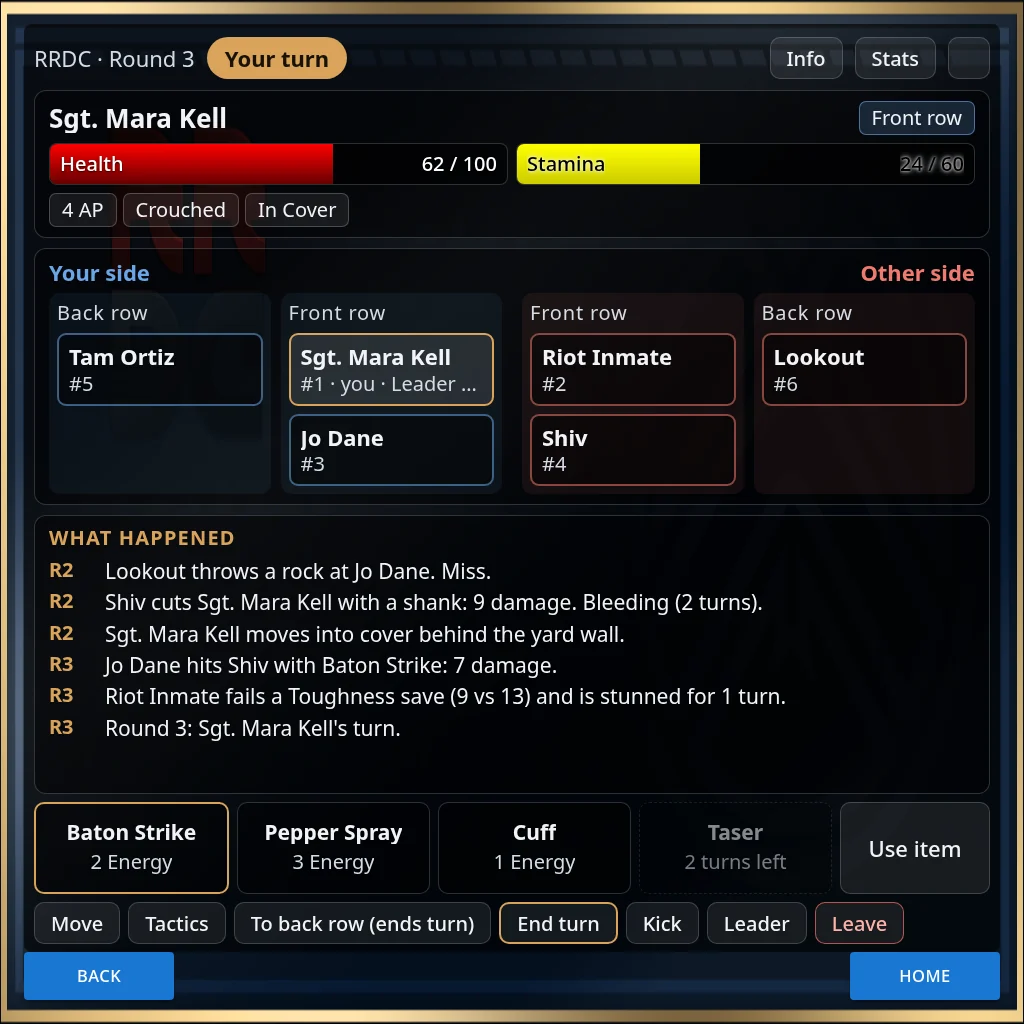
Info lists everyone in the fight with their team and distance or row. Stats shows your stats.
Leave, Kick and Leader
- Leave takes you out, passing your turn on first if it is yours. Leaving a started fight can mean a wound (see After a fight).
- If your sim uses escape rules, Leave may be refused once the fight has started. Use Flee in Tactics instead.
- Kick (leader only) lists the fighters. Press Kick next to one to remove them.
- Leader (leader only) lists the fighters. Press Set Leader to hand the fight over.
If the leader leaves, someone else becomes leader. When the last player leaves, the fight ends.