Rows, cover and range
How front and back rows, cover ratings, range bands and movement work, for sims that use them.
For playersThese rules decide who can reach whom and how hard you are to hit. Each is a switch your sim turns on or off, so you may meet some, all or none of them.
Front and back rows
If your sim uses rows, every fighter stands in their side’s front row or back row. You start in the row your sim sets for your class, usually the front. Rows show by your name, in the turn order and in the target picker.
- Melee can’t reach a side’s back row while anyone still stands in its front row. Once the front row is down, the back row is open.
- Melee from the back row does less damage.
- Reach weapons, ranged attacks and spells reach either row.
- An area ability asks you to pick a target, then hits everyone standing in that target’s row.
- An ability that picks its own targets takes the front row first.
To change row, press To back row or To front row on the fight page. It is free before Round 1: before the start, in a Surprise Round or in the Scatter Phase. From Round 1 the button reads To back row (ends turn) or To front row (ends turn), shows only on your turn, and ends it. In chat: @party row, @party row front or @party row back.
Cover rating
If your sim uses cover ratings, an attack on you has to beat your Cover Rating to hit, or match it where your sim counts a tie. This replaces the opposed defence roll.
Your rating is the highest of the things that apply to you:
- the cover you declared: Exposed, Stand-Off, In Cover or High Ground (High Ground only counts while you crouch or lie prone)
- sprinting, until your next turn starts
- being engaged in melee
- sneaking, if your sim uses stealth
Your sim sets the number for each. You declare cover with the Cover row in Tactics.
If your sim asks about flanking, an attacker past your flanking line ignores your In Cover or High Ground. With agreed flanking, you are asked to agree first. If you disagree, your cover stands.
If your sim asks after each move where you ended up, you count as Exposed until you answer.
Range bands
If your sim uses range bands, an ability with a range measures the distance between where the fight has you and your target on record. That record is taken at the start and updated when someone uses Move.
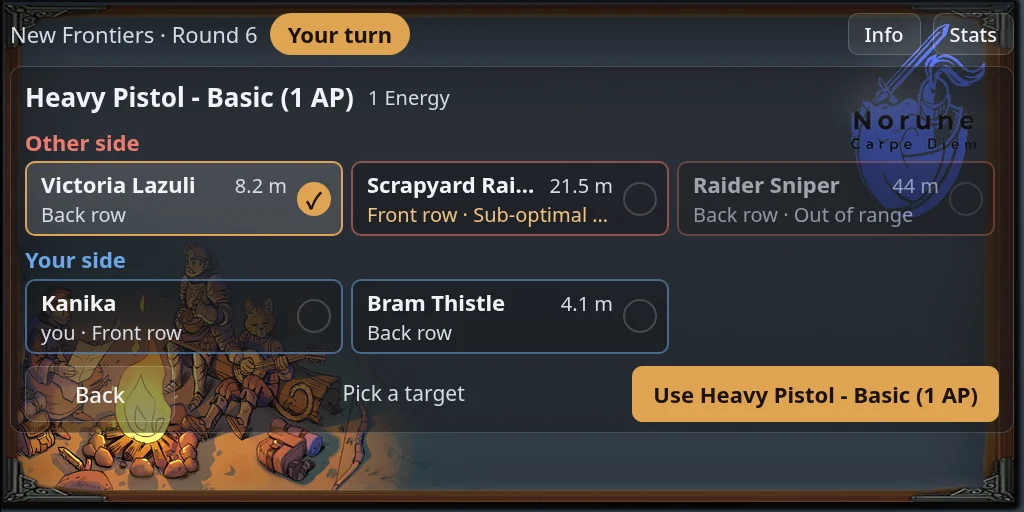
The target picker shows each distance beside the name, and the band under it:
- No band shown: in range, with no penalty.
- Sub-optimal range: you can still attack, with a penalty on the roll.
- Out of range: greyed out. Using the ability on them is refused, and chat tells you the distance and the ability’s reach. Some abilities also refuse targets that are too close.
Movement and the range ring
If your sim uses tactical movement, moving takes two presses of Move:
- On your turn, press Move and choose Normal, or where offered Stand & move, Water or Climbing.
- A ring appears around you showing how far you can go. If your sim uses banded rings, coloured bands show what each distance costs.
- Walk your avatar to a spot inside the ring and press Move again. The distance is charged in Energy.
- Pressing Move again without walking cancels the move.
- Outside the ring, you are told how far past it you are. Step back inside and press Move again.
- A move that uses your full allowance while standing on normal ground is a sprint, and goes further.
- If your sim uses move preview, the second press shows the distance, the cost and how far everyone is from your new spot. Press Move again, or End turn, to take the move.
While a move is under way, Move has a red border. With no Energy left to move, it is greyed out.