Tactics
The Tactics panel on the fight page, from stance and cover to grapples, gear and escaping.
For playersTactics on the fight page opens the moves you can make besides your abilities. It only shows what your sim uses and what applies to you right now.
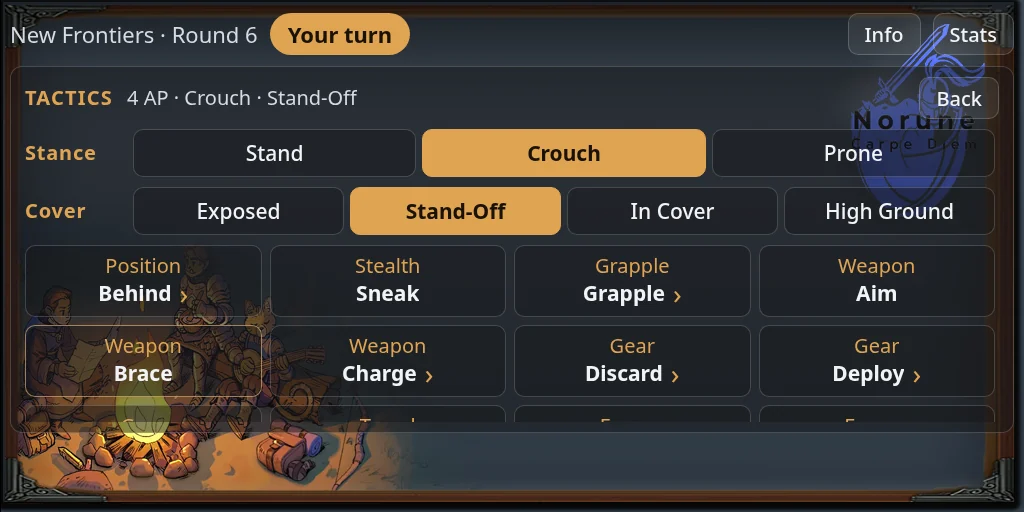
How the panel works
- It opens in place, at the size the fight page already has. Back returns to the fight.
- Tiles are grouped under small captions, such as Position, Stealth and Gear.
- A tile with an arrow opens a list. Picking an entry does it and takes you back to the fight.
- A few actions ask you first, such as Discard and Brace.
Most tactics work only on your turn, and many cost Energy. Off your turn only a few stay, such as Release and Where Am I.
Stance
If your sim uses tactical movement, the Stance row offers Stand, Crouch and Prone. Changing stance costs Energy. Crouching and lying prone shorten how far you can move.
In chat: @party stance crouch (or prone, stand).
Cover
If your sim uses cover ratings, the Cover row offers Exposed, Stand-Off, In Cover and High Ground. Press the one that matches where your avatar is. High Ground needs you to crouch or go prone first. See Rows, cover and range for how cover protects you.
If your sim uses emplacements, Behind lists the ones your side has placed. Stand close to one, pick it and press Take Cover. Attacks on you may then hit the emplacement instead, until you move or choose other cover.
In chat: @party cover exposed (or standoff, cover, high), or @party cover behind <name>.
Stealth
If your sim uses stealth, Sneak starts sneaking and Unsneak stops. Sneaking makes you harder to hit. You can’t start with enemies too close, or attack on the turn you start. Attacking, sprinting or being spotted reveals you.
Grapple
If your sim uses grappling:
- Grapple lists who you can grab, nearest enemies first. Press Grapple on one, and a roll decides it.
- Release lets go, even off your turn. Keeping hold costs Energy each turn.
- While held, Escape tries a roll to break free. Struggle always works. It costs more Energy and takes some from your next turn.
Weapon
If your sim uses weapon quirks:
- Aim spends Energy for a bonus on every roll of your next attack this turn.
- Brace, before you act, gives your next ranged attack a bonus and ends your turn right after it.
- Charge lists items that need charging. Abilities marked (Charged) use the charge up.
If your sim uses opportunity strikes, Disengage pays to leave melee this turn without giving the enemy a free strike.
Gear
- Discard (if your sim uses it) throws away an equipped item so nobody can loot it. A roll decides whether you get it back after the fight, or it is lost or taken.
- Deploy (if your sim uses emplacements) places a barricade, cover or turret you carry. Drag the token where you want it and press Done.
- Drones shows when your side has a drone or emplacement in the fight. It opens commands such as Control, Leash, Recall All and Status.
Travel and escape
- Area TP (if your sim uses scene transitions) lists the teleporters you can use in a fight. Press Go, use the real teleporter, then press Done once you have landed, or I didn’t go.
- Flee (if your sim uses escape rules) tries to get away. You need enough rounds gone, distance from every enemy, a few turns unhurt and no grapple. Then each enemy is asked whether they can see you.
- Flee (Ask) asks the other side to let you go. If every enemy agrees, you escape.
Where Am I
If your sim uses grappling or tactical movement, Where Am I puts a marker where the fight has you on record. Distances in the fight are measured from that spot.
A few more tiles appear only when they apply, such as Let Go while you cling to a wall and Unbind when something has restrained you.