Play in character
Switching between in character, out of character and away, setting up your titler, and earning experience for roleplay.
For playersThe HUD keeps track of whether you’re playing your character or speaking as yourself. Others see it on your titler, the floating text over your head.
In character, out of character, away
You’re always in one of three roleplay modes:
- In character (IC): you’re playing your character. Your titler shows your character in full.
- Out of character (OOC): you’re speaking as yourself. Your titler shows “OOC” and your name.
- Away (AFK): you’re away from the keyboard. Your titler shows “AFK” and your name.
To change mode, press the roleplay mode button on the Home screen. It reads In character, Out of character or Away, and each press moves to the next mode. In the Side menu layout, press OOC, IC or AFK.
Or type @ic, @ooc or @afk on your command channel. Chat confirms the change, for example “You have been set to IC.”
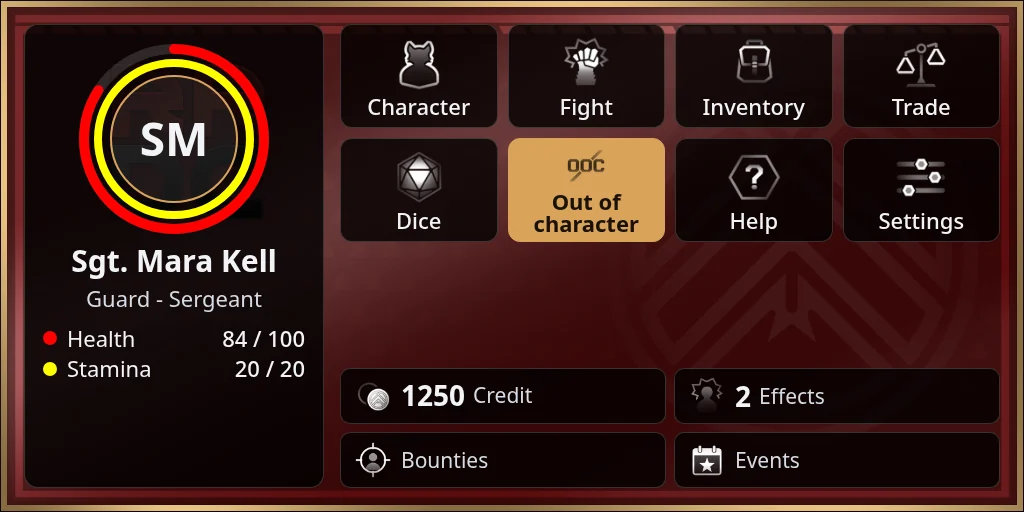
Your titler
Your titler always shows your character’s name. When you’re in character it shows more, depending on what your sim turns on: your level, species, effects, a few lines about your character, and your roleplay preferences. In a fight it shows fight details too.
To set what goes on it:
- Press Settings, then Titler.
- Fill in the parts you want:
- Alt Name: another name for your character. The titler shows it with your character’s name in brackets after it.
- Title: a word or two shown before your name, such as a rank.
- Info: a few lines about your character, shown when you’re in character.
- PVP, Rating, Depth and Intimacy: your roleplay preferences, picked from lists your sim sets up. You only see the ones your sim uses.
- Press Save. The HUD says “Saved.”
Emotes
Write emotes on your emotes channel. Its number is in the login message, and you can change it under Settings, Set Channels. If it’s 5, type /5 leans on the bar and orders a drink. The HUD says it in local chat under your character’s name, or your alt name if you’ve set one.
Experience for roleplay
If your sim uses it, you earn experience for roleplay you write on the emotes channel.
What you write is not stored. The HUD never sends the text of your emote to the server. For each emote of 20 characters or more, it sends only:
- how long it is
- a hash of it, a fingerprint that shows when an emote is repeated but can’t be turned back into the text
- where you were: the region and your position
- how many avatars were within 20 metres, and which ones
The server keeps this only for the regions your sim tracks.
How the experience works:
- You need someone to roleplay with. At least one other player wearing the HUD has to be near you, and you near them.
- A scene ends when it goes quiet for a while, and it has to last a few minutes to count.
- Your experience arrives after the scene ends, on the character you were playing.
- Repeating an emote, or copying someone else’s, doesn’t count. Emotes posted very close together don’t all count.
- Scenes with three or more people earn a little extra.
- There are limits per scene, per day and per week. Past the weekly limit you still earn, but much less.
Your sim sets the exact numbers. Some sims also pay a little money for roleplay.